

티스토리 뷰
어떤 문제는 다음 단계가 실행 중 발견한 정보에 따라 바뀌는 순간부터 고정 체인에 잘 들어맞지 않습니다. 이때 진짜 설계 질문은 “에이전트가 강력한가”가 아니라, 모델에게 줄 도구 선택지를 얼마나 좁고 명확하게 정의할 수 있는가입니다.
에이전트를 마법처럼 보면 운영이 금방 흐려집니다. 반대로 에이전트를 런타임 제어 루프로 보면 무엇을 관찰해야 하는지 선명해집니다. 어떤 도구를 왜 골랐는지, 실패했을 때 무엇을 봐야 하는지, 반복이 어디서 멈춰야 하는지가 중요해집니다.
이 글은 AI App Patterns 101 시리즈의 4번째 글입니다. 여기서는 에이전트와 도구 패턴이 언제 정당화되는지, 그리고 도구 선택을 어떻게 관찰 가능하고 디버깅 가능한 구조로 만들지 살펴봅니다.
이 글에서 다룰 문제
- 언제 고정 체인 대신
AgentExecutor를 쓰는 편이 맞을까요? - 계산기와 검색 도구 사이에서 LLM이 올바르게 고를 수 있게 하려면 도구 설명을 어떻게 써야 할까요?
- 도구를 선택하는 에이전트를 디버깅할 때 어떤 실행 흔적이 중요할까요?
에이전트는 모든 단계를 미리 하드코딩하는 대신, 모델이 런타임에 도구 호출 경로를 선택하게 하는 제어기입니다.

AI App Patterns 101 (4/6)
예제 코드: github.com/yeongseon-books/ai-app-patterns-101
지금까지 만든 체인은 모두 실행 경로가 고정되어 있었습니다. 입력이 들어오고, 단계가 순서대로 실행되고, 출력이 나갑니다. 에이전트 패턴은 여기서 달라집니다. LLM이 어떤 도구를 호출할지 결정하고, 그 결과를 읽고, 다음에 무엇을 할지 다시 결정합니다. 필요하다면 또 다른 도구를 호출할 수도 있고, 그 시점에서 최종 답을 낼 수도 있습니다.
다룰 주제는 다음과 같습니다.
- 에이전트와 체인의 차이
- 도구 정의와 등록
- ReAct 에이전트 구성
- 여러 도구 조합하기
에이전트 vs 체인
고정 체인과 동적 에이전트

Chain은 입력 → 단계 A → 단계 B → 출력으로 흐릅니다. 실행 경로는 설계 시점에 결정됩니다.
Agent는 입력 → LLM 추론 → 도구 선택 → 도구 실행 → 결과 관찰 → 필요하면 반복 → 최종 답변으로 흐릅니다. 실행 경로는 런타임에 결정됩니다.
에이전트는 ReAct(Reason + Act) 루프를 사용합니다. 즉 Thought → Action → Observation을 반복하다가, LLM이 답하기에 정보가 충분하다고 판단하는 순간 멈춥니다. LLM은 자신의 추론을 적고, 도구 이름을 고르고, 인자를 넣고, 도구 출력을 읽은 뒤 다시 추론합니다.
도구 정의
도구 레지스트리와 선택 표면
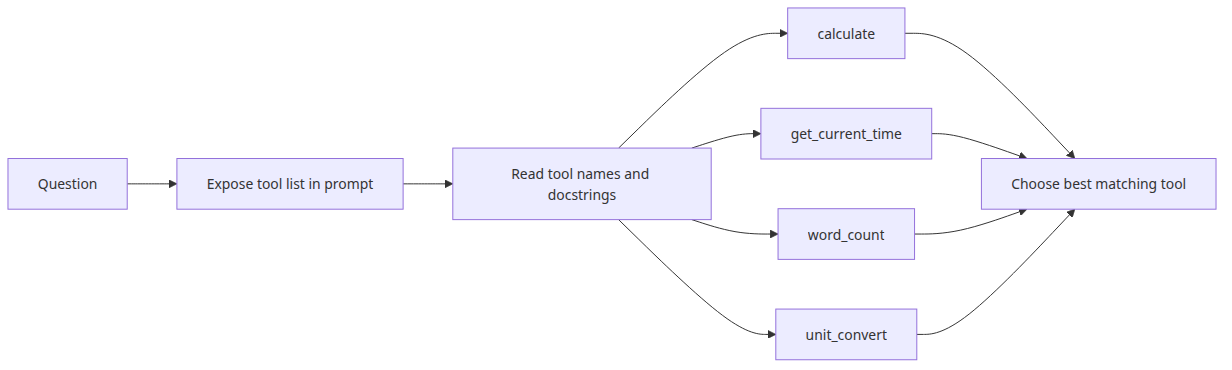
LangChain에서 도구는 @tool로 장식한 Python 함수입니다. docstring이 LLM이 도구를 고를 때 읽는 설명이 됩니다. 따라서 대충 쓸 수 없습니다. 모호한 docstring은 잘못된 도구 선택으로 곧장 이어집니다.
import math
import os
from datetime import datetime

from langchain_core.tools import tool

@tool
def calculate(expression: str) -> str:
    """
    Evaluate a mathematical expression and return the result.
    Examples: '2 + 3 * 4', 'sqrt(16)', 'pow(2, 10)'
    Uses Python expression syntax. Only math functions are allowed.
    """
    try:
        allowed = {
            "sqrt": math.sqrt,
            "pow": math.pow,
            "abs": abs,
            "round": round,
            "pi": math.pi,
            "e": math.e,
        }
        result = eval(expression, {"__builtins__": {}}, allowed)
        return str(result)
    except Exception as exc:
        return f"calculation error: {exc}"

@tool
def get_current_time(timezone: str = "Asia/Seoul") -> str:
    """
    Return the current date and time.
    The timezone parameter accepts a timezone name (default: Asia/Seoul).
    """
    now = datetime.now()
    return f"current time: {now.strftime('%Y-%m-%d %H:%M')} ({timezone})"

@tool
def word_count(text: str) -> str:
    """
    Return the word count and character count of the given text.
    """
    words = len(text.split())
    chars = len(text)
    chars_no_space = len(text.replace(" ", ""))
    return f"words: {words}, characters: {chars} (excluding spaces: {chars_no_space})"

@tool
def unit_convert(value: float, from_unit: str, to_unit: str) -> str:
    """
    Convert a value between units.
    Supported conversions: km/mile, kg/lb, celsius/fahrenheit, m/ft.
    Example: value=100, from_unit='km', to_unit='mile'
    """
    conversions = {
        ("km", "mile"): lambda x: x * 0.621371,
        ("mile", "km"): lambda x: x * 1.60934,
        ("kg", "lb"): lambda x: x * 2.20462,
        ("lb", "kg"): lambda x: x * 0.453592,
        ("celsius", "fahrenheit"): lambda x: x * 9 / 5 + 32,
        ("fahrenheit", "celsius"): lambda x: (x - 32) * 5 / 9,
        ("m", "ft"): lambda x: x * 3.28084,
        ("ft", "m"): lambda x: x * 0.3048,
    }
    key = (from_unit.lower(), to_unit.lower())
    if key not in conversions:
        return f"unsupported conversion: {from_unit} to {to_unit}"
    result = conversions[key](value)
    return f"{value} {from_unit} = {result:.4f} {to_unit}"
ReAct 에이전트 만들기
Thought action observation 루프

import os

from langchain.agents import AgentExecutor, create_react_agent
from langchain_core.prompts import PromptTemplate
from langchain_groq import ChatGroq

llm = ChatGroq(
    model="llama-3.1-8b-instant",
    api_key=os.environ["GROQ_API_KEY"],
)

tools = [calculate, get_current_time, word_count, unit_convert]

# ReAct prompt — instructs the LLM to follow the Thought/Action/Observation loop
react_prompt = PromptTemplate.from_template("""
You are an AI assistant that answers questions using the tools available to you.

Available tools:
{tools}

Tool names: {tool_names}

You MUST follow this exact format:

Question: the question to answer
Thought: think about how to approach the question
Action: the name of the tool to use (must be one from the tool names list)
Action Input: the input to pass to the tool
Observation: the result returned by the tool
... (repeat Thought/Action/Action Input/Observation as needed)
Thought: I now know the final answer
Final Answer: the final answer to the question

Begin!

Question: {input}
Thought: {agent_scratchpad}
""")

agent = create_react_agent(llm=llm, tools=tools, prompt=react_prompt)
agent_executor = AgentExecutor(
    agent=agent,
    tools=tools,
    verbose=True,
    max_iterations=5,
    handle_parsing_errors=True,
)

questions = [
    "What is 2 to the power of 10?",
    "What time is it now?",
    "How many miles is 100 kilometers?",
    "Count the words in this text, then multiply by 2: 'The quick brown fox jumps over the lazy dog'",
]

for question in questions:
    print(f"\n{'=' * 60}")
    print(f"question: {question}")
    result = agent_executor.invoke({"input": question})
    print(f"final answer: {result['output']}")
에이전트 추론 관찰하기
실행 흔적과 중단 조건
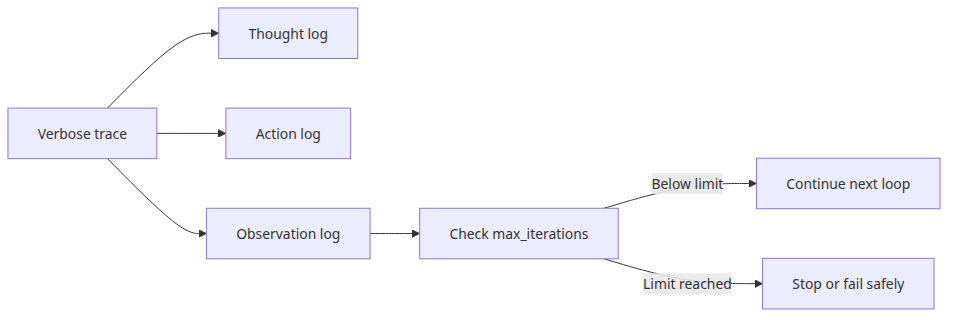
verbose=True를 주면 콘솔에 Thought, Action, Action Input, Observation이 모두 출력됩니다. 단순한 질문은 보통 한 번의 라운드로 끝납니다. 단어 수를 세고 그 결과에 2를 곱하는 식의 2단계 질문은 보통 두 라운드가 필요하고, 첫 번째 도구 출력이 두 번째 계산의 입력으로 이어집니다.
max_iterations는 무한 루프를 막는 안전장치입니다. 실용적인 작업은 대개 5~10회 안에서 충분합니다.
도구 오류를 우아하게 처리하기
Observation으로 되돌리는 도구 오류

도구가 처리되지 않은 예외를 던지면 에이전트는 멈춥니다. 반대로 도구 안에서 예외를 잡아 설명 문자열을 반환하면 에이전트는 계속 실행됩니다. 그 문자열이 Observation이 되고, LLM은 다른 접근을 시도하거나 실패 이유를 설명할 수 있습니다.
멘탈 모델은 “도구 예외를 죽이지 말고 에이전트의 관찰값으로 바꾸라”입니다. 에이전트 루프는 실패 신호까지 읽고 다음 행동을 결정하는 제어기이기 때문입니다.
@tool
def safe_divide(a: float, b: float) -> str:
    """Divide a by b. Returns an error message if b is zero."""
    if b == 0:
        return "error: cannot divide by zero"
    return str(a / b)
이 코드에서 먼저 볼 점
main.py는AgentExecutor데모를 계산기 실행기와 검색 실행기로 나누어 가장 작은 신뢰 가능한 도구 선택 패턴을 보여 줍니다.- 각 도구는
@tool(return_direct=True)를 사용해 선택된 도구 결과를 즉시 돌려줍니다. - 짧은 프롬프트와 좁은 도구 설명이 함수 호출 실패 모드를 줄입니다.
어디서 자주 헷갈릴까요?
- 에이전트는 자동으로 더 똑똑해지지 않습니다. 런타임 유연성을 얻는 대신 예측 가능성을 일부 포기합니다.
- 도구가 약하면 에이전트도 약합니다. 병목은 LLM이 아니라 도구 인터페이스일 때가 많습니다.
- 검색 도구와 RAG는 멀리서 보면 비슷해 보일 수 있지만, 하나는 도구 호출이고 다른 하나는 프롬프트 문맥 주입입니다.
체크리스트
- 각 도구에 명확한 설명과 입력 형태가 있다
-
AgentExecutor가 계산기 도구를 한 번 호출한다 -
AgentExecutor가 검색 도구를 한 번 호출한다 - 선택된 도구 결과가 호출자에게 직접 반환된다
정리
에이전트 패턴은 체인 기반 LLM 앱을 여러 단계와 여러 도구를 가로질러 추론할 수 있는 시스템으로 확장합니다. docstring은 LLM이 도구를 고를 때 가진 거의 유일한 신호입니다. 주석처럼 쓰지 말고 계약처럼 다뤄야 합니다. 도구는 좁고 분명해야 합니다. 하나의 책임, 예외 대신 오류 메시지, 같은 입력에 같은 동작이 기본입니다.
다음 글에서는 워크플로 자동화를 다룹니다. 각 단계가 데이터를 변환해 다음 단계로 넘기는 다단계 체인 설계입니다.
시리즈 목차
- 챗봇 패턴 — 대화 이력과 상태 관리
- RAG Q&A 패턴 — 문서 기반 질의응답
- 문서 어시스턴트 — 요약, 추출, 분류
- 에이전트와 도구 패턴 — 자율적 도구 선택 (현재 글)
- 워크플로 자동화 — 다단계 체인 설계 (예정)
- Human-in-the-loop — 사람 개입 설계 (예정)
참고 자료
'AI·LLM' 카테고리의 다른 글
| Human-in-the-loop — 사람 개입 설계 (0) | 2026.05.13 |
|---|---|
| 워크플로 자동화 — 다단계 체인 설계 (0) | 2026.05.13 |
| 문서 어시스턴트 — 요약, 추출, 분류 (0) | 2026.05.13 |
| RAG Q&A 패턴 — 문서 기반 질의응답 (0) | 2026.05.13 |
| 챗봇 패턴 — 대화 이력과 상태 관리 (0) | 2026.05.13 |
- Total
- Today
- Yesterday
- ai safety
- LLM
- langchain
- Refactoring
- harness
- Architecture
- rag
- AZURE
- DesignPatterns
- openAI
- Prompt engineering
- Production
- reliability
- Tool Use
- Python
- vector search
- softwaredesign
- DevOps
- ai agent
- Cloud
- webdevelopment
- backend
- AI Evaluation
- Agent
- Computer Science
- http
- APIDesign
- embeddings
- Cleancode
- Azure Functions
| 일 | 월 | 화 | 수 | 목 | 금 | 토 |
|---|---|---|---|---|---|---|
| 1 | 2 | |||||
| 3 | 4 | 5 | 6 | 7 | 8 | 9 |
| 10 | 11 | 12 | 13 | 14 | 15 | 16 |
| 17 | 18 | 19 | 20 | 21 | 22 | 23 |
| 24 | 25 | 26 | 27 | 28 | 29 | 30 |
| 31 |