
티스토리 뷰
Azure App Service는 웹 애플리케이션을 빠르고 쉽게 배포할 수 있는 Platform as a Service(PaaS)입니다. 웹 요청은 클라이언트에서 App Service로 들어오는 Inbound Traffic과 App Service에서 외부 리소스로 나가는 Outbound Traffic으로 나뉩니다. 네트워크 흐름을 제대로 이해해야 성능 최적화, 트러블슈팅, 그리고 외부 리소스와의 원활한 통신을 보장할 수 있습니다. 이번 글에서는 App Service의 네트워크를 깊이 파헤쳐, 클라이언트에서 들어오는 Inbound Traffic과 외부로 나가는 Outbound Traffic의 요청 흐름(Request Flow)을 상세히 설명하겠습니다.
지난 글에서 Azure App Service의 아키텍처를 살펴보았습니다. 이번 글에서는 Worker-1과 Worker-2에서 각각 app-1과 app-2가 실행 중인 시나리오를 기준으로 트래픽이 어떻게 처리되는지 단계별로 설명해보겠습니다.
app-1(app-1.azurewebsites.net)은 웹 API로 Inbound 요청을 받고, app-2(app-2.azurewebsite.net)은 외부 API로 Outbound 요청을 보낸다고 가정하겠습니다. 전체 구성도는 다음과 같습니다.

1. Inbound Traffic (클라이언트 → App Service)
먼저 Inbound Traffic은 클라이언트가 app-1(app-1.azurewebsites.net)에 요청을 보낼 때의 흐름입니다.
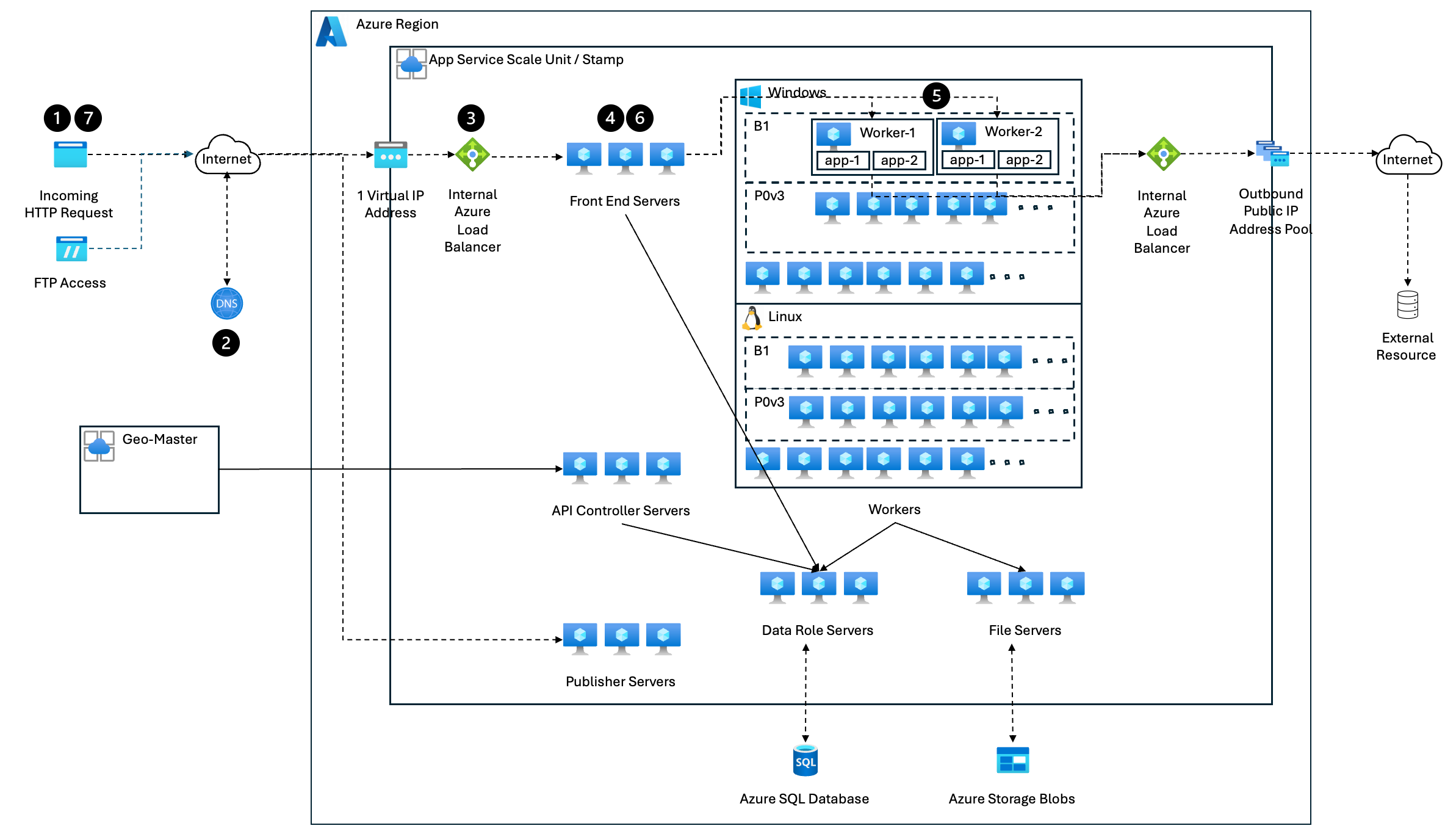
상세 흐름은 다음과 같습니다.
1. 클라이언트 (HTTPS 요청)
   │
   ▼
2. DNS 조회 (VIP 반환)
   │
   ▼
3. 내부 Load Balancer (L4 부하 분산)
   │
   ▼
4. Frontend Role (L7 리버스 프록시)
   │
   ▼
5. Worker Role (애플리케이션 실행)
   │
   ▼
6. Frontend Role (응답 반환)
   │
   ▼
7. 클라이언트 (응답 수신)
1) 클라이언트 요청 (HTTPS 요청 시작)
클라이언트가 웹앱에 접근하면, 웹브라우저나 API 클라이언트는 HTTPS 요청을 전송합니다.
> curl -v https://app-1.azurewebsites.net/api/data
*   Trying 52.154.27.101:443...
* Connected to myapp.azurewebsites.net (52.154.27.101) port 443
> GET /api/data HTTP/1.1
> Host: app-1.azurewebsites.net
> User-Agent: curl/7.68.0
> Accept: */*
2) DNS 조회 (VIP 반환)
DNS 서버는 도메인(app-1.azurewebsites.net)에 대한 고정 VIP(Virtual IP)를 반환합니다. Azure App Service에서 Inbound Traffic은 하나의 VIP(Virtual IP Address)를 통해 수신됩니다. Azure App Service에서 VIP가 1개인 이유는 단일 진입점을 통해 트래픽을 효과적으로 관리하기 위해서입니다.
> nslookup app-1.azurewebsites.net
...

Non-authoritative answer:
Name:    app-1.azurewebsites.net
Address: 52.154.27.1013) 내부 Load Balancer (L4 부하 분산)
Azure Load Balancer는 요청을 App Service의 Frontend Role로 트래픽을 분산합니다.
VIP: 52.154.27.101 → 프론트엔드 서버 1
                   → 프론트엔드 서버 2
4) Frontend Role (L7 리버스 프록시)
Frontend Role은 Kestrel & YARP기반의 리버스 프록시로 동작하며 다음과 같은 역할을 수행합니다.
- TLS 종료:
- 클라이언트와의 HTTPS 연결을 해제하고, 내부 통신은 HTTP로 변환하여 성능을 최적화합니다.
- 도메인 매핑:
- 외부 도메인과 내부 Worker 인스턴스(IP:포트)를 매핑합니다.
- 예: app-1.azurewebsites.net → 10.0.0.5:8080
- ARR Affinity 쿠키 발급:
- 세션 지속성 유지를 위해 ARR Affinity 쿠키를 생성합니다.
- 후속 요청 시 초기 연결된 Worker로 지속 연결됩니다.
curl 응답 헤더:
< Set-Cookie: ARRAffinity=abc123; Path=/; HttpOnlyARR Affinity 없는 경우: Azure의 내부 로드 밸런싱 알고리즘에 따라 Worker가 선택됩니다.
ARR Affinity 설정 시: 초기 요청을 처리한 Worker와 지속 연결합니다.
5) Worker Role (애플리케이션 실행)
Frontend는 ARR Affinity 기반으로 2개의 App Service 인스턴스(Worker) 중 하나를 선택해 요청을 전달합니다.
예: Worker 1 (10.0.0.5) 또는 Worker 2 (10.0.0.6)
웹앱은 비즈니스 로직 수행, DB 조회, API 호출 등을 실행합니다.
Worker Role 내부 로그:
[2025-02-22T12:30:15Z] GET /api/data
[2025-02-22T12:30:16Z] Data retrieved successfully!
6) Frontend Role (응답 반환)
Worker Role이 응답을 완료하면 Frontend Role은 클라이언트에게 응답을 반환합니다.
curl 응답 본문:
{"message": "Data retrieved successfully!"}7) 클라이언트 응답 수신 (세션 유지)
클라이언트는 응답과 함께 ARR Affinity 쿠키를 수신합니다. 후속 요청 시 ARR Affinity 쿠키를 포함하면 동일한 Worker로 연결을 요청합니다.
> curl -v --cookie "ARRAffinity=abc123" https://myapp.azurewebsites.net/api/data
< HTTP/1.1 200 OK
< Set-Cookie: ARRAffinity=abc123; Path=/; HttpOnly
2. Outbound Traffic (App Service -> 외부 리소스)
Outbound Traffic은 app-2(app2.azurewebsites.net)가 외부 API(https//api/example.com/data)로 Outbound 요청을 보낼 때의 흐름입니다.
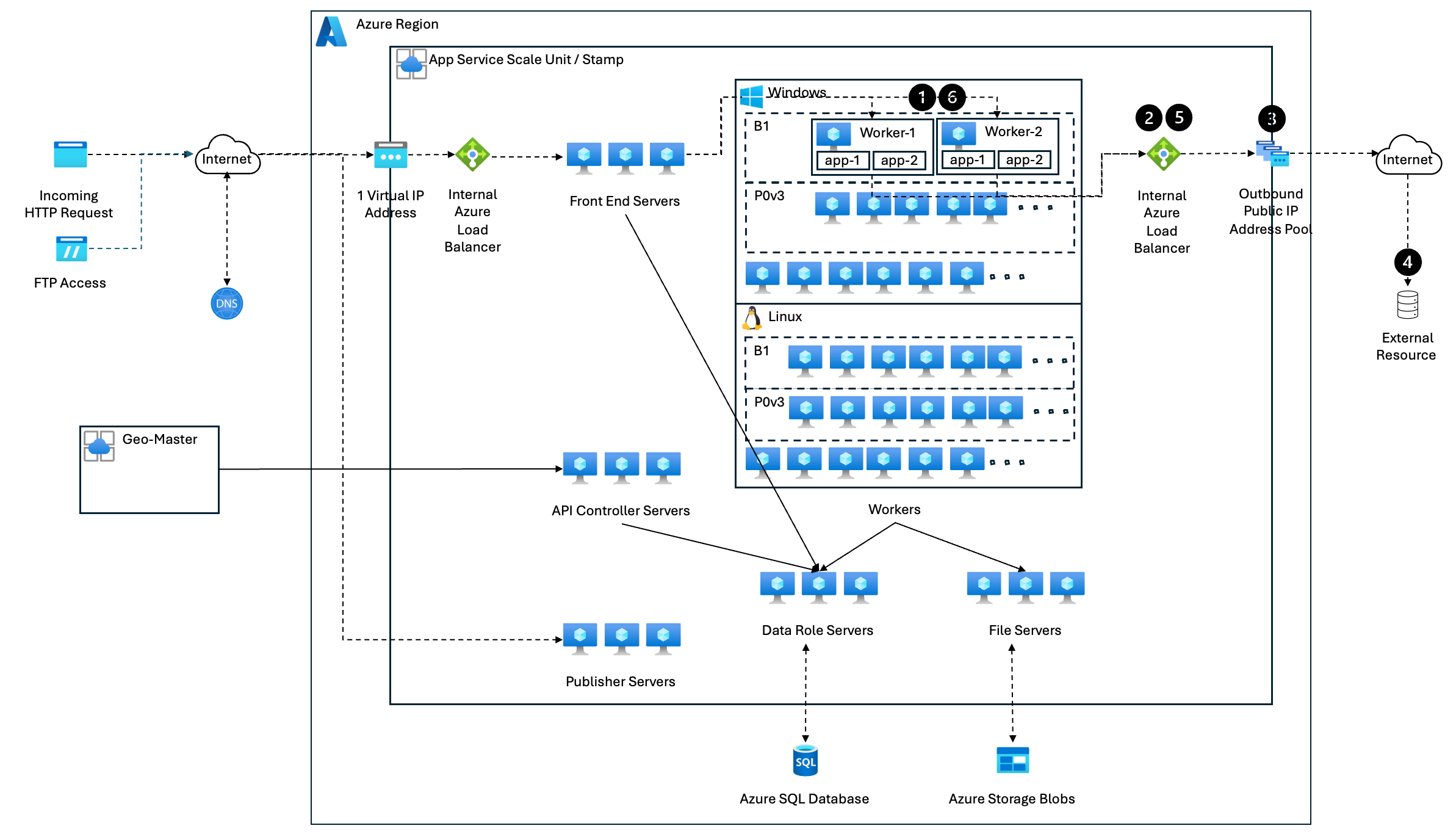
상세 흐름은 다음과 같습니다.
1. Worker Role (외부 요청 시작)
   │
   ▼
2. 내부 Load Balancer (SNAT 수행)
   │
   ▼
3. Outbound Public IP Address
   │
   ▼
4. 외부 리소스 (API, DB 등과 통신)
   │
   ▼
5. 내부 Load Balancer (NAT 해제)
   │
   ▼
6. Worker Role (응답 처리 및 클라이언트 전달)
1) Worker Role (외부 리소스 요청 시작)
App Service는 외부 API 또는 DB와 통신할 때 Worker Role에서 Outbound 요청을 수행합니다.
curl 명령어:
> curl -v https://api.example.com/data
*   Trying 13.107.21.200:443...
* Connected to api.example.com (13.107.21.200) port 443
> GET /data HTTP/1.1
> Host: api.example.com
> User-Agent: curl/7.68.0
> Accept: */*
>
< HTTP/1.1 200 OK
< Content-Type: application/json
< Content-Length: 58
<
{"result": "External data retrieved successfully!"}
2) 내부 Load Balancer (SNAT 수행)
Azure App Service 내부 Load Balancer가 SNAT (Source Network Address Translation) 과정에서는 사설 IP(10.x.x.x)를 Outbound Public IP Pool 중 하나로 변환합니다. App Service의 Worker Role은 사설 IP를 사용하기 때문에, 인터넷과 직접 통신이 불가능합니다.
IP 변환 예:
10.0.0.5:34000 (Worker1)
→ SNAT 수행
→ 52.154.30.201:50000 (Outbound Public IP)
SNAT은 출발지 IP를 공용 IP로 변환하여 외부 리소스(API, DB 등)와의 연결을 가능하게 합니다. 하지만, SNAT 포트 수는 제한적이며, 대량의 Outbound 요청(API 호출, DB 연결 등)이 있을 경우 SNAT 포트 고갈 문제가 발생할 수 있습니다.
3) Outbound Public IP Address
Azure App Service는 4~8개의 동적 Outbound IP Pool (App Service Plan에 따라 변동) 중 하나를 선택하여 외부 리소스에 요청을 보냅니다.
Outbound IP Pool:
- 52.154.30.201
- 52.154.30.202
- 52.154.30.203
- 52.154.30.204
참고: Outbound IP는 기본적으로 Azure에서 동적으로 할당되며, 변경될 수 있습니다. 특정한 Static Outbound IP를 사용하려면 Azure VNET 통합 및 NAT Gateway 설정이 필요합니다.
4)외부 리소스 (API, DB 등과 통신)
외부 리소스(예: API, 데이터베이스 등)에서 요청을 처리하고 응답을 반환합니다.
요청 흐름:
52.154.30.201:50000 → api.example.com:443외부 API 로그:
[2025-02-22T12:35:10Z] GET /data
Source IP: 52.154.30.201
외부 API 응답 예:
{
  "result": "External data retrieved successfully!"
}
5) 내부 Load Balancer (SNAT 해제)
외부 리소스가 응답을 반환하면, Azure App Service의 내부 Load Balancer는 SNAT 해제 (Reverse NAT 수행)하여 원래 요청을 보낸 Worker로 응답을 전달합니다.
Outbound Public IP: 52.154.30.201:50000
→ 사설 IP: 10.0.0.5:34000
6) Worker Role (응답 처리 및 클라이언트 전달)
Worker Role은 외부 리소스의 응답을 처리하고 클라이언트에게 전달합니다.
응답 본문:
{
  "result": "External data retrieved successfully!"
}
애플리케이션 로그:
[2025-02-22T12:35:15Z] Response received from external API: External data retrieved successfully!
결론
이번 글에서는 Azure App Service의 Inbound 및 Outbound Traffic Flow를 2개의 App Service 인스턴스 환경을 기준으로 살펴보았습니다.
- Inbound: 클라이언트 요청 → Load Balancer → Frontend → Worker → 최종 응답
- Outbound: App Service → SNAT → Public IP → 외부 리소스 → 응답 반환
이 과정에서 ARR Affinity, SNAT 포트, Azure Load Balancer의 역할을 이해하면 성능 최적화와 장애 예방에 큰 도움이 됩니다. 특히, SNAT 포트 고갈은 외부 통신 안정성에 영향을 미치므로, App Service Plan 확장이나 NAT Gateway 구성으로 사전 대비하는 것이 중요합니다. 이해를 바탕으로 안정적이고 확장 가능한 App Service 환경을 구성하시길 바랍니다
참고자료
https://learn.microsoft.com/en-us/azure/app-service/networking-features
Networking features - Azure App Service
Learn about the networking features in Azure App Service, and learn which features you need for security or other functionality.
learn.microsoft.com
https://azure.github.io/AppService/2020/08/14/zero_to_hero_pt6.html
Zero to Hero with App Service, Part 6: Securing your web app
The Azure App Service is offered as two deployment types: the multi-tenant service and the App Service Environment. In the multi-tenant service there are thousands of customers on the same infrastructure. Your apps are always secured but the network, the a
azure.github.io
https://devblogs.microsoft.com/dotnet/bringing-kestrel-and-yarp-to-azure-app-services/
A Heavy Lift: Bringing Kestrel + YARP to Azure App Services - .NET Blog
In this post, we get a behind-the-scenes look at the engineering work required to change a critical platform component with code paths that are exercised billions of times a day while minimizing service disruptions and maintaining SLA for our customers.
devblogs.microsoft.com
https://4lowtherabbit.github.io/blogs/2019/10/SNAT/
SNAT with App Service
SNAT with App Service Usually, an App Service web application needs to connect to a few external endpoints, like SQL database, Redis cache or another Restful web service, etc. However, an App service web application cannot establish network connections to
4lowtherabbit.github.io
'Azure' 카테고리의 다른 글
| Azure App Service란? - 플랫폼 아키텍처 이해하기 (2) | 2026.04.10 |
|---|---|
| Azure App Service에서 Worker Instance의 개념과 구조 (0) | 2025.03.09 |
| Azure App Service Plan: 웹앱을 실행하는 핵심 인프라 개념 이해하기 (0) | 2025.02.16 |
| Azure App Service Architecture 살펴보기 (0) | 2025.02.15 |
| Azure Functions Architecture 완벽분석 (0) | 2025.02.06 |
- Total
- Today
- Yesterday
- AZURE
- LLM
- serverless
- appserviceplan
- AppService
- faiss
- Kubernetes
- Cloud
- Azure Functions
- Ai
- app service
- langchain
- CloudArchitecture
- ALTAIR
- aks
- cloudcomputing
- 공공데이터
- streaming
- vector search
- 데이터시각화
- embeddings
- Document Processing
- Tutorial
- pandas
- DevOps
- openAI
- scaling
- Prompt engineering
- rag
- Python
| 일 | 월 | 화 | 수 | 목 | 금 | 토 |
|---|---|---|---|---|---|---|
| 1 | 2 | |||||
| 3 | 4 | 5 | 6 | 7 | 8 | 9 |
| 10 | 11 | 12 | 13 | 14 | 15 | 16 |
| 17 | 18 | 19 | 20 | 21 | 22 | 23 |
| 24 | 25 | 26 | 27 | 28 | 29 | 30 |
| 31 |