

티스토리 뷰
RAG를 처음 배우면 많은 사람이 곧바로 프롬프트 문구부터 만지기 시작합니다. 하지만 실제로는 그보다 앞단에서 더 중요한 일이 있습니다. 질문에 대해 어떤 문서를 꺼내 올지 결정하는 검색 단계입니다. 프롬프트가 아무리 좋아도, 모델 앞에 놓인 문서가 틀리거나 잡음이 많으면 답변 품질은 쉽게 흔들립니다.
LangChain은 이 검색 단계를 VectorStore와 Retriever로 나눠 표현합니다. 저장소와 검색 인터페이스를 분리해 두면, 뒤쪽 체인은 "어떤 저장 엔진을 썼는가"보다 "질문을 넣으면 관련 문서 리스트가 나온다"는 계약만 신경 쓰면 됩니다.
이 글에서 다룰 문제
- LangChain은 왜 Retriever를 그 아래 VectorStore와 분리할까요?
as_retriever()가 체인 안에서 어떤 입력/출력 계약을 제공할까요?- 검색된 문서를 프롬프트에 넣기 전에 어떤 형식으로 정리해야 할까요?
- RAG 품질의 상당 부분은 왜 LLM 호출 이전에 결정될까요?
k, 검색 방식, 문서 포맷터는 어떤 식으로 먼저 조정해야 할까요?
Retriever는 스스로 지식을 저장하지 않습니다. 질문을 받아, 모델에게 보여 줄 가치가 있는 문서 일부를 골라 주는 검색 경계입니다.

최소 실행 예제
from langchain_community.embeddings import HuggingFaceEmbeddings
from langchain_community.vectorstores import FAISS

embedding = HuggingFaceEmbeddings(model_name="sentence-transformers/all-MiniLM-L6-v2")
vectorstore = FAISS.from_texts([
    "FAISS is a high-speed vector search library.",
    "A Retriever finds documents relevant to a question.",
], embedding)
retriever = vectorstore.as_retriever(search_kwargs={"k": 1})

print(retriever.invoke("What does a Retriever do?")[0].page_content)
Output
A Retriever finds documents relevant to a question.이 짧은 예제의 핵심은 검색 엔진 내부 구현이 아니라 계약입니다. 임베딩 모델은 텍스트를 벡터로 만들고, VectorStore는 그것을 저장하고, Retriever는 질문을 받아 관련 문서 리스트를 돌려줍니다. 뒤쪽 체인은 이제 question -> list[Document]만 알면 됩니다.
이 코드에서 먼저 볼 점
- 임베딩 모델은 텍스트를 벡터로 바꾸고, Retriever는 질문을 문서 리스트로 바꾸는 인터페이스를 제공합니다.
- 체인 나머지는
question -> list[Document]계약만 알면 됩니다. - 검색 결과는 아직 프롬프트에 바로 넣을 수 있는 상태가 아니므로, 포맷팅 단계가 하나 더 필요합니다.
- RAG에서는 초반에 프롬프트보다 검색 품질이 더 큰 영향을 주는 경우가 많습니다.
엔지니어가 여기서 자주 헷갈리는 지점
- VectorStore를 만들었다고 해서 곧바로 usable한 RAG 체인이 생기는 것은 아닙니다.
k를 크게 올린다고 항상 좋아지지 않습니다. 회수율과 함께 잡음도 늘어납니다.- Retriever는 답을 생성하지 않습니다. 답을 위해 필요한 문맥을 고릅니다.
체크리스트
- VectorStore와 Retriever의 차이를 설명할 수 있다
-
list[Document]를 프롬프트용 context 문자열로 바꿀 수 있다 - Retriever를 LCEL 체인에 연결할 수 있다
LangChain 101 (3/6)
Example code: github.com/yeongseon-books/langchain-101
이 글에서 다룰 문제
- Retriever는 VectorStore와 어떤 관계일까요?
as_retriever()이후에 어떤 검색 파라미터를 먼저 조정해야 할까요?- 검색된 문서를 프롬프트 컨텍스트로 바꿀 때 무엇을 조심해야 할까요?
- 기본 RAG 체인 안에서 Retriever는 어느 위치에 들어갈까요?
Retriever는 LangChain의 검색 경계입니다. 질문에 관련 문서를 골라 다음 체인이 답을 만들 수 있도록 문맥을 넘깁니다.
전체 흐름 한눈에 보기

Retriever는 질의를 받아 관련 문서 리스트를 반환합니다. LangChain은 이를 특정 벡터 DB 문법이 아니라 공통 검색 인터페이스로 감싸기 때문에, 뒤쪽 체인은 FAISS를 쓰든 Chroma를 쓰든 Elasticsearch를 쓰든 같은 방식으로 다룰 수 있습니다.
이 글에서는 FAISS 기반 Retriever를 만들고, 그것을 프롬프트에 연결해 가장 기본적인 RAG 구조를 조립해 보겠습니다. 다룰 항목은 다음과 같습니다.
- FAISS VectorStore와 Retriever 만들기
as_retriever()와 검색 파라미터- Retriever를 체인에 연결하는 패턴
- 검색 문서를 context로 주입하는 방식
- 여러 문서를 하나의 context 문자열로 합치는 이유
FAISS VectorStore 만들기

LangChain의 FAISS 클래스는 FAISS 인덱스를 VectorStore 인터페이스 뒤에 감쌉니다. 문자열 리스트와 임베딩 모델만 넘기면, 인덱스 생성과 저장 구조는 클래스가 처리합니다.
pip install langchain langchain-community faiss-cpu sentence-transformers langchain-groqfrom langchain_community.embeddings import HuggingFaceEmbeddings
from langchain_community.vectorstores import FAISS
embedding_model = HuggingFaceEmbeddings(
model_name="sentence-transformers/all-MiniLM-L6-v2",
model_kwargs={"device": "cpu"},
encode_kwargs={"normalize_embeddings": True},
)
documents = [
"FAISS is a high-speed vector search library developed at Facebook AI Research.",
"Cosine similarity measures the directional similarity between two vectors.",
"Embedding models project text into a high-dimensional vector space.",
"sentence-transformers specializes in sentence-level embeddings.",
"Vector search captures semantic similarity that keyword search misses.",
"RAG combines retrieved documents with an LLM prompt.",
"Chunking strategies split long documents into embedding-sized units.",
]
vectorstore = FAISS.from_texts(
texts=documents,
embedding=embedding_model,
)
print(f"index vector count: {vectorstore.index.ntotal}")Output
index vector count: 7여기서 중요한 포인트는 검색 애플리케이션이 인덱싱 시점과 질의 시점으로 나뉜다는 점입니다. 문서를 벡터로 바꾸고 저장하는 비용은 보통 미리 지불하고, 사용자 요청 시에는 그 인덱스를 조회합니다. 이 구분이 흐려지면 데모는 돌아가도 실서비스에서는 불필요하게 느려집니다.
Retriever 만들기
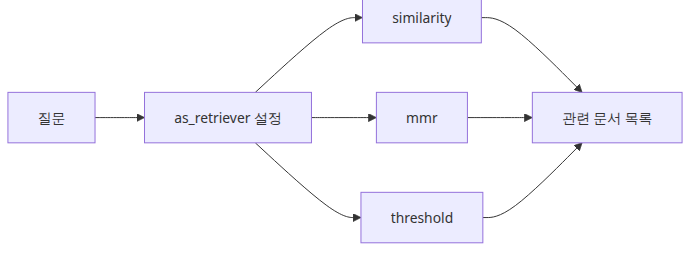
as_retriever()는 VectorStore를 Retriever 인터페이스로 감쌉니다. 그 결과 뒤쪽 체인은 저장소 구현 대신 검색 계약만 보게 됩니다.
retriever = vectorstore.as_retriever(
    search_type="similarity",  # default: cosine similarity
    search_kwargs={"k": 3},    # number of results to return
)

docs = retriever.invoke("how vector search works")

for i, doc in enumerate(docs):
    print(f"[{i}] {doc.page_content}")
여기서 조정할 수 있는 대표 search_type은 세 가지입니다.
"similarity": 코사인 유사도 기반 top-k 검색"mmr": 관련성과 다양성을 함께 고려하는 maximal marginal relevance"similarity_score_threshold": 임계치 이상인 문서만 반환
# MMR — prioritize diversity
retriever_mmr = vectorstore.as_retriever(
    search_type="mmr",
    search_kwargs={"k": 3, "fetch_k": 10, "lambda_mult": 0.5},
)
운영 관점에서 보면 k와 search_type은 프롬프트 문구보다 먼저 손대야 할 튜닝 포인트입니다. 답변이 엉뚱하면 많은 팀이 prompt를 바꾸지만, 실제 원인은 검색 recall이나 context 잡음인 경우가 더 많습니다.
Retriever를 체인에 연결하기

가장 기본적인 RAG 패턴은 이렇습니다. 관련 문서를 검색하고, 그것을 context로 합치고, 질문과 함께 프롬프트에 넣고, LLM이 답하게 합니다.
import os

from langchain_community.embeddings import HuggingFaceEmbeddings
from langchain_community.vectorstores import FAISS
from langchain_core.output_parsers import StrOutputParser
from langchain_core.prompts import ChatPromptTemplate
from langchain_core.runnables import RunnablePassthrough
from langchain_groq import ChatGroq

def format_docs(docs: list) -> str:
    """Combine a list of documents into a single context string."""
    return "\n\n".join(doc.page_content for doc in docs)

embedding_model = HuggingFaceEmbeddings(
    model_name="sentence-transformers/all-MiniLM-L6-v2",
    model_kwargs={"device": "cpu"},
    encode_kwargs={"normalize_embeddings": True},
)

documents = [
    "FAISS is a high-speed vector search library developed at Facebook AI Research.",
    "Cosine similarity measures the directional similarity between two vectors.",
    "Embedding models project text into a high-dimensional vector space.",
    "sentence-transformers specializes in sentence-level embeddings.",
    "Vector search captures semantic similarity that keyword search misses.",
    "RAG combines retrieved documents with an LLM prompt.",
]

vectorstore = FAISS.from_texts(texts=documents, embedding=embedding_model)
retriever = vectorstore.as_retriever(search_kwargs={"k": 3})

prompt = ChatPromptTemplate.from_messages([
    (
        "system",
        "Answer the question using only the provided documents. "
        "If the answer is not in the documents, say you don't know.\n\n"
        "Documents:\n{context}",
    ),
    ("human", "{question}"),
])

llm = ChatGroq(
    model="llama-3.1-8b-instant",
    api_key=os.environ["GROQ_API_KEY"],
)

rag_chain = (
    {
        "context": retriever | format_docs,
        "question": RunnablePassthrough(),
    }
    | prompt
    | llm
    | StrOutputParser()
)

questions = [
    "What is FAISS?",
    "How does the RAG pattern work?",
    "What do embedding models do?",
]

for question in questions:
    print(f"\nquestion: {question}")
    answer = rag_chain.invoke(question)
    print(f"answer: {answer}")
Output
question: What is FAISS?
answer: FAISS is a high-speed vector search library developed at Facebook AI Research.

question: How does the RAG pattern work?
answer: According to the documents, RAG (Retrieval Augmented Generator) combines retrieved documents with an LLM (Large Language Model) prompt, but it doesn't explain the specifics of the pattern.

question: What do embedding models do?
answer: Embedding models project text into a high-dimensional vector space.
핵심은 이 입력 dict입니다.
{
    "context": retriever | format_docs,
    "question": RunnablePassthrough(),
}
retriever | format_docs는 질문을 받아 문서를 찾고, 그 문서를 하나의 문자열로 합칩니다. RunnablePassthrough()는 원래 질문을 그대로 question 키로 전달합니다. 이 패턴이 LangChain RAG 체인의 표준형이라고 보면 됩니다.
VectorStore 저장하고 다시 불러오기

from langchain_community.embeddings import HuggingFaceEmbeddings
from langchain_community.vectorstores import FAISS

embedding_model = HuggingFaceEmbeddings(
    model_name="sentence-transformers/all-MiniLM-L6-v2",
    model_kwargs={"device": "cpu"},
    encode_kwargs={"normalize_embeddings": True},
)

documents = [
    "FAISS is a high-speed vector search library developed at Facebook AI Research.",
    "RAG combines retrieved documents with an LLM prompt.",
]

vectorstore = FAISS.from_texts(texts=documents, embedding=embedding_model)

# save
vectorstore.save_local("faiss_store")
print("saved")

# reload
loaded_store = FAISS.load_local(
    "faiss_store",
    embeddings=embedding_model,
    allow_dangerous_deserialization=True,
)
print(f"reloaded: {loaded_store.index.ntotal} vectors")

# verify
results = loaded_store.similarity_search("vector search", k=1)
print(f"\nresult: {results[0].page_content}")
Output
saved
reloaded: 2 vectors

result: FAISS is a high-speed vector search library developed at Facebook AI Research.
이 예제가 중요한 이유는 Retriever가 보통 일회성 메모리 데모 위에 있지 않기 때문입니다. 실제 서비스에서는 인덱스를 재사용하고, 색인 파이프라인과 질의 파이프라인을 분리하는 것이 기본입니다.
이 코드에서 주목할 점
- VectorStore는 저장 레이어이고, Retriever는 그 위에 얹힌 질의 인터페이스입니다.
retriever | format_docs는 검색 결과를 프롬프트용 context로 넘기는 표준 LCEL 브리지입니다.RunnablePassthrough()는 원래 질문을 별도 키로 유지해 prompt가 context와 question을 모두 보게 합니다.- 인덱스 저장/재로딩 예제가 중요한 이유는, 실전 Retriever는 대개 재사용 가능한 인덱스 위에 올라가기 때문입니다.
엔지니어가 자주 헷갈리는 지점
- Retriever는 답을 생성하지 않습니다. 문서를 선택할 뿐이고, 최종 응답 합성은 여전히 LLM이 합니다.
- 검색 품질 문제를 프롬프트 문제로 오진하는 경우가 많습니다. prompt를 바꾸기 전에 chunking, embedding,
k를 먼저 확인해야 합니다. - 문서를 단순히 이어 붙이면 context window를 금방 넘길 수 있으므로,
format_docs는 길이 제어 지점이기도 합니다.
체크리스트
- VectorStore와 Retriever 차이를 설명할 수 있다
- 가장 먼저 조정할
search_kwargs가 무엇인지 안다 - 검색 문서를 프롬프트에 넣기 전에 포맷팅이 필요한 이유를 이해했다
정리
Retriever 인터페이스는 뒤에 어떤 검색 시스템이 있든 공통 질의 계약으로 감싸 줍니다. LangChain에서 RAG를 조립할 때는 context: retriever | format_docs, question: RunnablePassthrough() 패턴이 사실상 기본형입니다.
다음 글에서는 Tool Calling으로 넘어가, 모델이 외부 함수를 요청하고 애플리케이션이 그 결과를 다시 대화에 주입하는 루프를 보겠습니다.
시리즈 목차
- LangChain 소개 — LCEL과 Runnable 기본
- Prompt와 LLM Chain — 체인 첫 번째 구성
- Retriever — 문서 검색과 컨텍스트 주입 (현재 글)
- Tool Calling — 외부 도구 연결하기 (예정)
- Streaming — 실시간 출력 처리 (예정)
- 실전 체인 조립 — 컴포넌트를 하나로 연결하기 (예정)
참고 자료
'AI·LLM' 카테고리의 다른 글
| Streaming — 실시간 출력 처리 (0) | 2026.05.11 |
|---|---|
| Tool Calling — 외부 도구 연결하기 (0) | 2026.05.11 |
| Prompt와 LLM Chain — 체인 첫 번째 구성 (0) | 2026.05.11 |
| LangChain 소개 — LCEL과 Runnable 기본 (0) | 2026.05.11 |
| 문서 수집 파이프라인 완성 (0) | 2026.05.05 |
- Total
- Today
- Yesterday
- softwaredesign
- ai safety
- Computer Science
- langchain
- backend
- embeddings
- Cloud
- LLM
- Tool Use
- Architecture
- DesignPatterns
- openAI
- DevOps
- rag
- AI Evaluation
- harness
- Production
- vector search
- APIDesign
- frontend
- webdevelopment
- ai agent
- Azure Functions
- http
- reliability
- Agent
- Refactoring
- AZURE
- Python
- Cleancode
| 일 | 월 | 화 | 수 | 목 | 금 | 토 |
|---|---|---|---|---|---|---|
| 1 | 2 | |||||
| 3 | 4 | 5 | 6 | 7 | 8 | 9 |
| 10 | 11 | 12 | 13 | 14 | 15 | 16 |
| 17 | 18 | 19 | 20 | 21 | 22 | 23 |
| 24 | 25 | 26 | 27 | 28 | 29 | 30 |
| 31 |